No-Code in 2026: How to Ship Apps Without Writing Code
Originally published on Medium. Read here free — no account needed.
AI tools finally deliver on what drag-and-drop builders promised
Remember when “no-code” meant dragging boxes around in Webflow until you hit a wall? You’d build 80% of what you wanted, then discover that one feature you needed was impossible without “custom code injection” or paying a developer.
That era is over.
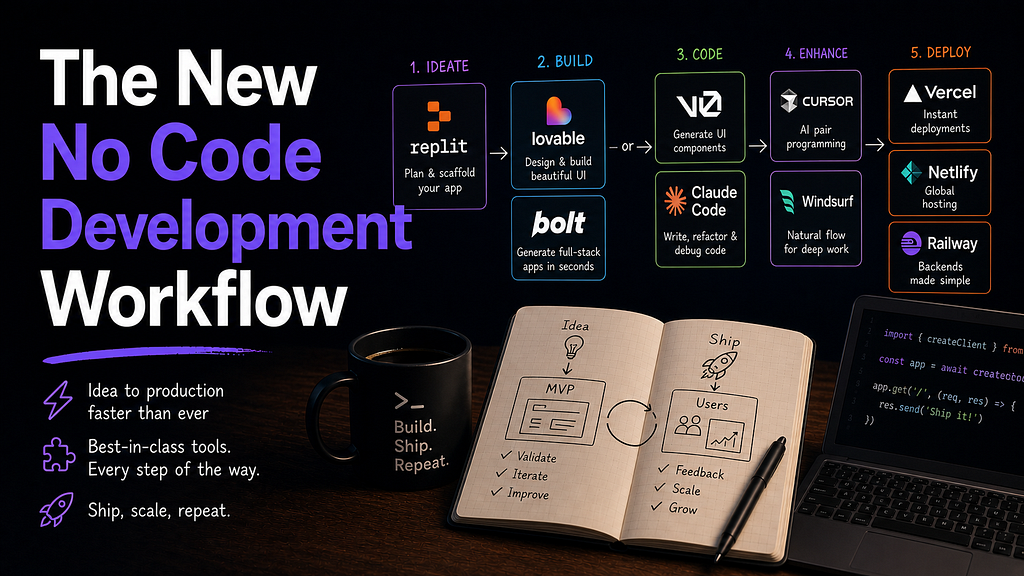
The 2026 no-code workflow looks completely different. You describe what you want in plain English. AI builds a working app. You refine it with more conversation. Then you ship it to real users, and you own every line of code even if you never read it.
I’ve watched non-technical founders go from idea to deployed product in an afternoon. I’ve seen designers prototype functional apps that developers couldn’t distinguish from hand-coded work. The ceiling isn’t drag-and-drop anymore. It’s how well you can describe what you want.
Here’s the exact workflow.
The Three-Stage Approach
The modern no-code workflow has three stages:
- Prototype — AI builds the first working version
- Iterate — AI IDE refines and extends
- Ship — Deploy to real infrastructure
Each stage uses different tools, and knowing when to graduate from one to the next is the key insight.
The beauty of this approach is that you start with maximum AI assistance and take more control only when you need it. Most projects never leave stage one. Some need the precision of stage two. All of them ship faster than learning to code from scratch or fighting with traditional no-code platforms.
Stage 1: AI Prototyping Tools 🛠️
Goal: Working app in under an hour
This is where most projects should start. You describe your app in plain English, the AI generates a functional prototype, and you iterate through conversation.
Lovable
What it is: A conversational app builder that creates full-stack web apps from natural language prompts.
Key Features:
- Describe your app in plain language, get working code
- Full-stack output including frontend, backend, and database
- Built-in deployment and hosting
- Export complete source code anytime
Why You Should Use It: Lovable is the fastest path from idea to working app. The interface is dead simple: describe what you want, watch it build, refine through conversation. Most users get a functional prototype in 15–30 minutes.
The critical difference from old-school no-code: Lovable generates real React code you can export and modify. No proprietary runtime. No vendor lock-in. If you outgrow it, take your code and leave.
Start here for MVPs, internal tools, landing pages with functionality, or any app where you want to validate the idea before investing significant time.
Replit Agent
What it is: An AI pair programmer inside a complete development environment. Think coding assistant + hosting + deployment in one browser tab.
Key Features:
- Full development environment with AI assistance
- Handles complex multi-file projects
- Built-in database, auth, and deployment
- Real-time collaboration
- More control over the generated code
Why You Should Use It: When your project is too complex for Lovable (multiple user roles, complex data relationships, custom integrations) Replit Agent gives you more control without requiring you to leave the AI-assisted environment.
The tradeoff is steeper learning curve, more decisions to make.
The upside is you can build more sophisticated apps and stay in one environment from prototype through production.
Choose Replit Agent when you know upfront that your app will need significant complexity, or when you want to learn more about how the code works as you go.
Other Options Worth Knowing
Bolt (by StackBlitz) — Browser-based app builder with instant previews. Exports clean code. Great for quick experiments when you want to see results immediately. Best for simpler projects.
v0 (by Vercel) — UI-focused tool that generates React components from prompts. In my experience, v0 doesn’t do great with full apps. Think landing pages, design prototypes, and UI components you’ll integrate elsewhere.
Quick Decision Guide
Tool Best For Complexity Free Tier Lovable Quick MVPs, simple-to-medium apps Low Yes Replit Agent Complex apps, ongoing development Medium Limited Bolt Browser experiments, simple prototypes Low Yes v0 UI components, landing pages Low Yes
The rule: Start with Lovable unless you have a specific reason not to. Graduate to Replit Agent if you hit limitations. Use Bolt for throwaway experiments. Use v0 for design work only.
Stage 2: Graduate to an AI IDE
Goal: Take control when AI prototyping tools hit their limits
Most projects won’t need this stage, but when the prototyping tool can’t handle your requirements, or you need integrations it doesn’t support, you graduate to an AI-powered IDE.
The key: you’re not starting from scratch. You export your code from Stage 1 and continue with more powerful tools.
When to Graduate
You know it’s time when:
- The AI tool can’t implement a feature you need
- You need integrations or APIs it doesn’t support
- You want proper version control and git workflow
- The app is successful and needs professional maintenance
Claude Code
What it is: Anthropic’s terminal-native AI coding assistant. Lives in your command line, works with any codebase, operates autonomously on complex tasks.
Key Features:
- Works from the terminal, so no IDE switching
- Understands entire codebases through context
- Autonomous multi-step task execution
- Integrates with Git, GitHub, and command-line tools
- Can handle entire workflows from reading requirements to submitting PRs
Why You Should Use It: Claude Code is the power tool. You export your code from Lovable, open a terminal, and tell it, “Add user authentication using Supabase.” It reads the existing code, understands the structure, and implements the feature.
The conversation style feels natural. “Now add a settings page where users can update their profile.” It handles the multi-file changes, understands what already exists, and extends rather than overwrites.
Best for developers comfortable in the terminal, or anyone tackling significant feature additions to exported codebases.
Cursor
What it is: A VS Code fork with AI deeply integrated into the editor experience.
Key Features:
- Familiar VS Code interface
- Inline AI editing (select code, describe changes)
- Codebase-wide context awareness
- Multi-file refactoring
- Choice of AI models
Why You Should Use It: If terminal feels intimidating, Cursor offers the same power in a visual editor. You see your files, see the changes happening, and interact through a familiar interface.
The inline editing is intuitive. Highlight code, press Cmd+K, describe what you want changed, and Cursor rewrites it. For developers coming from VS Code, or non-developers who want to see what’s happening, this is often more approachable than terminal-native tools.
Windsurf
What it is: Another AI-powered IDE, similar to Cursor with a different UX approach.
Key Features:
- VS Code-based interface
- AI chat and inline editing
- Codebase understanding
- Different workflow philosophy than Cursor
Why You Should Use It: Windsurf is a solid alternative to Cursor. Some users prefer its UX patterns. Try both free tiers and pick what feels more natural for how you think.
Comparison
Tool Interface Best For Claude Code Terminal/CLI Power users, complex multi-file work Cursor VS Code-like Visual learners, familiar IDE experience Windsurf VS Code-like Alternative to Cursor, different UX
The Handoff Process
- Export or clone your code from the prototyping tool
- Open in your AI IDE of choice
- Use natural language to describe what you need
- AI understands the existing codebase and extends it
The critical insight: you still don’t need to “know how to code” in the traditional sense. You need to know how to describe what you want and review what the AI produces. That’s a learnable skill that’s much faster to acquire than programming.
Stage 3: Ship It 🚀
Goal: Get your app in front of real users
Deployment used to be the scary part. Now it’s often the easiest step.
Where to Deploy
Vercel — Best for React/Next.js apps (which most AI tools generate). Connect your repository, configure a few settings, and you’re live. Generous free tier handles most personal and early-stage projects.
Netlify — Similar to Vercel, great for static sites and JAMstack apps. Slightly different feature set.
Railway — When your app needs a backend server or database. Easy setup, reasonable pricing, handles the complexity of server deployment.
Replit Deployments — If you built in Replit, deploy directly from there. One less tool in the chain.
What You Actually Need to Know
Even in the AI-assisted workflow, three concepts come up repeatedly:
Environment variables: API keys and secrets your app needs. Every deployment platform has a place to set these. You’ll copy values from services like Supabase, Stripe, or whatever APIs your app uses.
Domain setup: Connecting your custom domain (myapp.com) to your deployed app. This is usually: add a DNS record, wait for propagation, done.
Error messages: When something breaks, you’ll read logs. AI tools (including Claude Code and Cursor) are excellent at explaining error messages and suggesting fixes. Paste the error, ask what went wrong, apply the fix.
You’re not learning to code. You’re learning to operate, and that’s a much smaller surface area.
A Real Example: Habit Tracker
Let me walk through a concrete example to make this tangible.
The idea: A habit tracker where you can add habits, mark them complete each day, and see your weekly streak.
Stage 1: Lovable
Open Lovable. Prompt:
“Build me a habit tracker where I can add habits, mark them complete each day, and see a weekly streak visualization.”
In 10–15 minutes, you have a working app. You can add habits. You can check them off. There’s a visual streak display. It stores data locally.
You test it, refine the UI through conversation (“Make the streak display larger and use green for completed days”), and get to something you like.
Then you realize that you want user accounts so your habits sync across devices.
Stage 2: Claude Code
Lovable’s built-in auth isn’t quite what you need, or you want to use Supabase for the backend. Time to graduate.
Export the code from Lovable. Open a terminal:
cd habit-tracker
claude
Tell Claude Code:
“Add Supabase authentication. Users should be able to sign up with email, and their habits should be stored per-user in Supabase instead of local storage.”
Claude Code reads the existing codebase, understands the structure, and implements the changes across multiple files — auth components, database hooks, protected routes.
You review the changes, test the app, ask for adjustments (“Add a loading state while checking auth status”), and iterate until it works.
Stage 3: Vercel
Push to GitHub. Connect to Vercel. Add your Supabase environment variables. Deploy.
You have a production app with user authentication, cloud storage, and a custom domain if you want one.
Total time from idea to deployed product: an afternoon. No traditional coding required.
The Skills That Still Matter
This workflow doesn’t require you to “learn to code” in the traditional sense. But a few skills dramatically improve your results:
Clear prompting. The more precisely you describe what you want, the better output you get. This is learnable. Pay attention to what works and what doesn’t.
Mental model of frontend vs. backend. You don’t need to write code, but understanding that “the thing users see” and “the thing that stores data” are different, helps you communicate more effectively with AI tools.
Code review intuition. You’re not writing code, but you’re approving code. Develop the habit of reading what AI generates, asking “does this make sense?”, and flagging anything that looks wrong.
Basic git workflow. git add, git commit, git push. That's usually enough. AI tools can guide you through more complex operations.
Reading error messages. Something will break. Your job is to paste the error into your AI tool and ask for help. You don’t need to understand the error, you need to know to ask.
The honest take: you’re not “not coding.” You’re coding at a higher level of abstraction. And that level is accessible to far more people than traditional programming.
Security: The Non-Negotiable Step
Here’s the part most “no-code” tutorials skip: if your app handles user data, you need a security review before going live.
AI-generated code is functional. It’s often clean, but AI tools optimize for “does it work?” not “is it secure?” They can introduce vulnerabilities without realizing it. Exposed API keys, SQL injection points, insecure authentication flows, unencrypted data storage all have very real consequences in production applications that handle any kind of user data.
When security review is mandatory:
- User accounts and authentication
- Payment processing (Stripe, credit cards, any financial data)
- Contact information (emails, phone numbers, addresses)
- Health or medical information
- Any personally identifiable information (PII)
If your app touches any of these, don’t skip this step.
What a security audit looks like:
For simple projects, you can use AI tools themselves. Ask Claude Code or Cursor: “Review this codebase for security vulnerabilities, especially around authentication, data storage, and API endpoints.” They’ll flag obvious issues — hardcoded secrets, missing input validation, insecure configurations.
For anything handling payments or sensitive PII, get a professional review. This doesn’t mean hiring a full security team. Services like Snyk, GitGuardian, or a freelance security consultant can review your code for a few hundred dollars. Compare that to the cost of a data breach.
Minimum checklist before launching with user data:
- No API keys or secrets in the codebase (use environment variables)
- Authentication tokens are stored securely (not localStorage for sensitive apps)
- User inputs are validated and sanitized
- Database queries are parameterized (prevents SQL injection)
- HTTPS is enforced
- Sensitive data is encrypted at rest
The workflow in this article is powerful. But power without responsibility is how breaches happen. If you’re storing user data, treat security review as Stage 3.5, not optional, not “we’ll do it later.”
When This Workflow Breaks Down
I want to be honest about limitations.
Complex business logic. When you need precise control over calculations, validation rules, or multi-step processes, AI-generated code needs more review and refinement. The workflow still works, it just takes more iterations.
Performance-critical applications. If milliseconds matter, you’ll need someone who understands optimization. AI tools can help, but performance tuning requires deeper expertise.
Heavily regulated industries. Healthcare, finance, legal. When compliance requirements are strict, you need professional review of any code that handles sensitive data.
Deep customization. When you need pixel-perfect custom animations or highly specific interactions, you’ll hit the limits of what conversation-based development can achieve efficiently.
The honest answer: This workflow gets you 80% of the way. The last 20% depends on your specific requirements. For many projects (MVPs, internal tools, personal projects, simple SaaS) 80% is enough to validate and ship.
The Bottom Line 💡
The “no-code” promise was always about removing barriers between ideas and working software. Traditional no-code tools got halfway there, then hit walls.
The 2026 workflow actually delivers:
- Start with AI prototyping tools (Lovable, Replit Agent) — get a working app in minutes to hours
- Graduate to AI IDEs (Claude Code, Cursor) — when you need more control
- Deploy to modern infrastructure (Vercel, Netlify, Railway) — production-ready with minimal configuration
You own the code. There’s no vendor lock-in. Each tool generates standard code you can take anywhere.
The technical barrier to building software has never been lower. The question isn’t “can you code?” anymore. It’s “can you clearly describe what you want to build?”
Most people can. Most people should try.
What would you build if the technical barrier was gone? Seriously — what idea have you been sitting on because “I’d need to learn to code first”?
Try this workflow with a simple project. Start with Lovable or Bolt. Give it one hour. You might surprise yourself.