8 MCP Servers Every Developer Should Try in 2026: Stop Copy-Pasting Into Your AI
Originally published on Medium. Read here free — no account needed.
You ask your AI assistant to fix a bug. It writes the fix. Then you copy it, paste it into your editor, run the tests yourself, copy the error back, paste it into the chat, and wait for round two.
That copy-paste loop is the single biggest tax on working with AI today. MCP is what removes it.
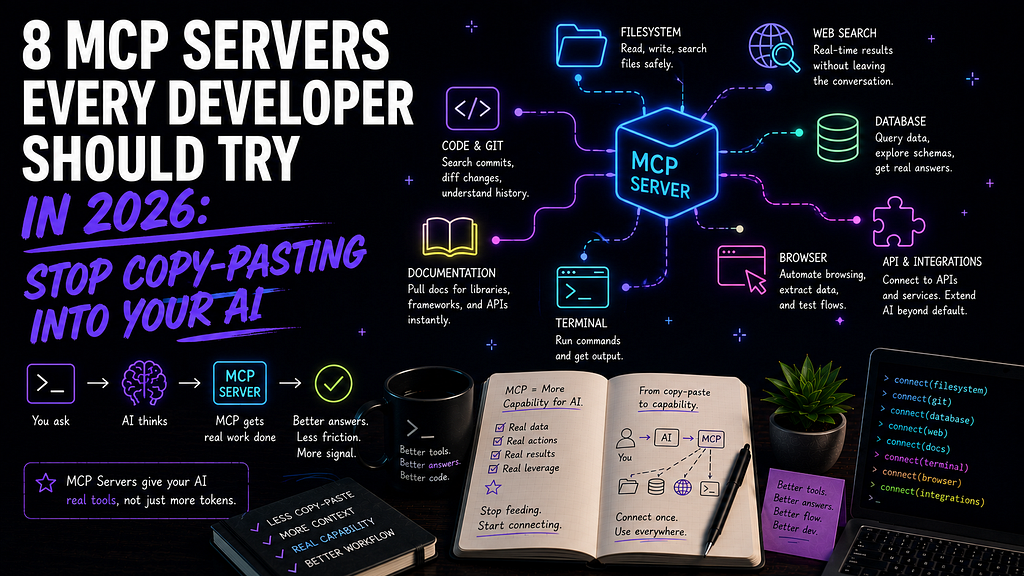
MCP (Model Context Protocol) is an open standard Anthropic shipped in late 2024. Think of it as a USB port for AI assistants. Instead of your model living in a sealed box, MCP servers give it hands. It can read your files, run your terminal, open a pull request, query your database, and check your error logs directly. No more copy-paste relay race.
I’ve spent the last year wiring MCP servers into my daily Claude Code workflow (I even built a set of custom skills, Staksmith, on top of them). Some servers earned a permanent spot. Plenty didn’t. Here are the 8 that actually pull their weight, mixed between the obvious anchors and a couple you probably haven’t tried yet.
First, How MCP Servers Actually Work
An MCP server is just a small program that exposes tools to your AI client. Your client (Claude Code, Claude Desktop, Cursor, Cline, VS Code, and a growing list of others) connects to it and suddenly has new abilities.
Setup is usually a few lines of JSON in your client’s config. Most servers look something like the block below.
{
  "mcpServers": {
    "github": {
      "command": "docker",
      "args": [
        "run", "-i", "--rm",
        "-e", "GITHUB_PERSONAL_ACCESS_TOKEN",
        "ghcr.io/github/github-mcp-server"
      ],
      "env": {
        "GITHUB_PERSONAL_ACCESS_TOKEN": "<your-scoped-token>"
      }
    }
  }
}
One quick word of caution before the list, because honest filtering is the whole point here. MCP gives your AI real access to real systems. Scope your tokens to the minimum they need, prefer read-only where it’s offered, and don’t point a write-enabled database server at production on day one. Treat these like you’d treat handing a new teammate your credentials. With that out of the way, here’s the list. 🛠️
1. GitHub MCP Server
Description: The official server from GitHub. It connects your assistant directly to repositories, issues, pull requests, and Actions, so the whole issue-to-PR loop happens without you leaving the conversation.
Key Features:
- Create, read, and comment on issues and pull requests
- Browse repo file trees and read files without cloning
- Trigger and inspect GitHub Actions runs
- Search code and repositories across your orgs
- Official and actively maintained by GitHub
Why You Should Use It: This is the one I’d install first. “Open an issue for that UI bug, then draft a PR that fixes it” stops being three context switches and becomes one sentence. For early-career devs especially, it takes the friction out of contributing to open source, because the mechanical parts of the GitHub dance get handled for you while you focus on the actual change.
2. Context7 💡
Description: Context7 pulls real, version-specific documentation straight into your AI’s context. It’s the fix for the most annoying AI failure mode: confidently inventing an API that doesn’t exist, or using one that got deprecated two versions ago.
Key Features:
- Up-to-date, version-pinned docs for thousands of libraries
- Pulls real code examples from the actual source
- Works with a simple “use context7” in your prompt
- No tab-switching to read docs yourself
- Free to use
Why You Should Use It: If you’ve ever shipped code an AI hallucinated and watched it explode at runtime, this is your seatbelt. Instead of guessing what react-router v7 looks like, your assistant reads the current docs first, then writes against them. It's a small add that quietly kills a whole category of frustrating, hard-to-spot bugs. This is the lesser-known pick I push hardest.
3. Desktop Commander MCP
Description: This one hands your assistant the terminal and your filesystem. It can run commands, stream long-running output, search across directories, and make surgical edits to files, all locally and without per-token API charges for the file operations.
Key Features:
- Run terminal commands with real-time output streaming
- Full filesystem operations (read, write, move, search)
- Pattern-based find-and-replace across a codebase
- Manages long-running processes and sessions
- Detailed audit logs of every action taken
Why You Should Use It: This is what turns “AI that suggests commands” into “AI that runs them and reads the results.” Scaffolding a project, chasing a failing test, grepping through an unfamiliar codebase, it does the legwork and reports back. If you want the lighter, official alternative, the Filesystem MCP server covers file reads and writes without the terminal access. Start there if full shell access makes you nervous, and it should.
Reality check: A server that can run any terminal command is exactly as powerful and as dangerous as that sounds. Keep approval prompts on, and don’t let it loose unsupervised on anything you can’t afford to lose.
4. PostgreSQL MCP Server
Description: Connect your assistant to a Postgres database and ask questions in plain English. It reads your schema, runs queries, and can even explain slow queries and suggest indexes.
Key Features:
- Natural-language queries against your real schema
- Reads table structure so answers match your actual data
- Query plan analysis and index recommendations
- Read-only mode for safe exploration
- Works with local and hosted Postgres
Why You Should Use It: “Which users signed up last week but never finished onboarding?” becomes a question you ask, not a query you hand-write at 11pm. For devs still building SQL fluency, it’s also a great teacher, because you can ask for the query, read what it generates, and learn the patterns instead of staring at a blank editor.
Reality check: Point it at a read-only replica or a dev database first. A natural-language interface to production data with write access is a bad first date.
5. Playwright MCP Server
Description: Microsoft’s official server that lets your assistant drive a real browser. It navigates pages, fills forms, clicks buttons, and reads what’s actually on screen, which makes it genuinely useful for testing UIs and automating web tasks.
Key Features:
- Controls a real Chromium, Firefox, or WebKit browser
- Uses the accessibility tree, so it’s fast and reliable (no flaky pixel-guessing)
- Fills forms, clicks, and navigates like a user
- Captures screenshots and page state
- Great for generating and debugging end-to-end tests
Why You Should Use It: Writing end-to-end tests is the chore everyone postpones. Here you can describe the flow (“log in, add an item to the cart, check out”) and have your assistant walk through it in a live browser, then generate the test from what it did. It’s also a fast way to reproduce a bug report without manually clicking through the same eleven steps yourself.
6. Sentry MCP Server
Description: The official Sentry server pulls your error and performance data into the conversation. Your assistant can read a stack trace, see how often an issue fires, and connect it back to the code that caused it.
Key Features:
- Read live issues, stack traces, and event details
- See error frequency and affected users
- Trace an exception back to the offending code path
- Triage and summarize what’s actually on fire
- Built specifically for agent workflows, not a thin API wrapper
Why You Should Use It: This closes the loop between “something broke in production” and “here’s the fix.” Instead of alt-tabbing between your Sentry dashboard and your editor, you ask your assistant to pull the top issue, explain it, and propose a patch, all in one place. Sentry’s team is one of the few building MCP servers designed for agents from the ground up, and you feel the difference in how clean the output is.
7. Sequential Thinking MCP Server
Description: An official server that gives your assistant a structured space to reason step by step. Instead of blurting out an answer, the model works through a problem in explicit, revisable stages.
Key Features:
- Breaks complex problems into ordered, visible steps
- Lets the model revise earlier thinking as it goes
- Useful for planning, debugging, and architecture decisions
- No external accounts or API keys required
- One of the most-used servers in the ecosystem
Why You Should Use It: Not every MCP server connects to an outside system. This one improves the thinking itself. When you’re staring down a gnarly refactor or a “why is this race condition happening” problem, prompting your assistant to think sequentially produces noticeably more careful reasoning than a one-shot answer. It’s the cheapest quality upgrade on this list.
8. Notion MCP Server ✨
Description: The official Notion server lets your assistant read and write your workspace, including its pages, databases, and all the docs your team actually lives in.
Key Features:
- Create, read, and update Notion pages and databases
- Pull project context and specs into the conversation
- Turn meeting notes into tasks or docs automatically
- Official, maintained by Notion
- Bridges your knowledge base and your code
Why You Should Use It: Your context shouldn’t live in two worlds. With this, your assistant can read the spec in Notion before it writes the feature, or drop a summary of what it just built back into the right page. If your team runs on Notion, it quietly removes the “let me go find that doc” tax. (Obsidian devotee like me? You can wire your assistant to your local vault instead, but for team workspaces, Notion is the move.)
Quick Decision Guide
Not sure where to start? Pick by the pain you feel most this week.
If you want to:
- Install Stop the copy-paste loop with GitHub — GitHub MCP
- Kill hallucinated, outdated APIs — Context7
- Let your AI run your machine — Desktop Commander
- Talk to your database in English — PostgreSQL MCP
- Automate and test the browser — Playwright MCP
- Fix production errors faster — Sentry MCP
- Get sharper reasoning on hard problems — Sequential Thinking
- Connect your docs to your code — Notion MCP
If you only try one this weekend, make it GitHub MCP plus Context7. Together they cover the two things you do most: moving code and getting accurate answers about it.
The bigger shift is worth naming. MCP, custom skills, and plain old CLI access are converging into one connectivity stack, and 2026 is the year that stack goes mainstream. The developers who get comfortable with it now are the ones whose AI actually does the work, instead of just talking about it.
So, which one are you installing first? Drop it in the comments, and tell me which server you think I left off the list.